
How to Optimize Your Glovo Menu Photos in 2026
Improve your dish images with tools like AI Food Photo to achieve studio quality, meet Glovo requirements, and create a more appetizing and competitive menu in minutes.
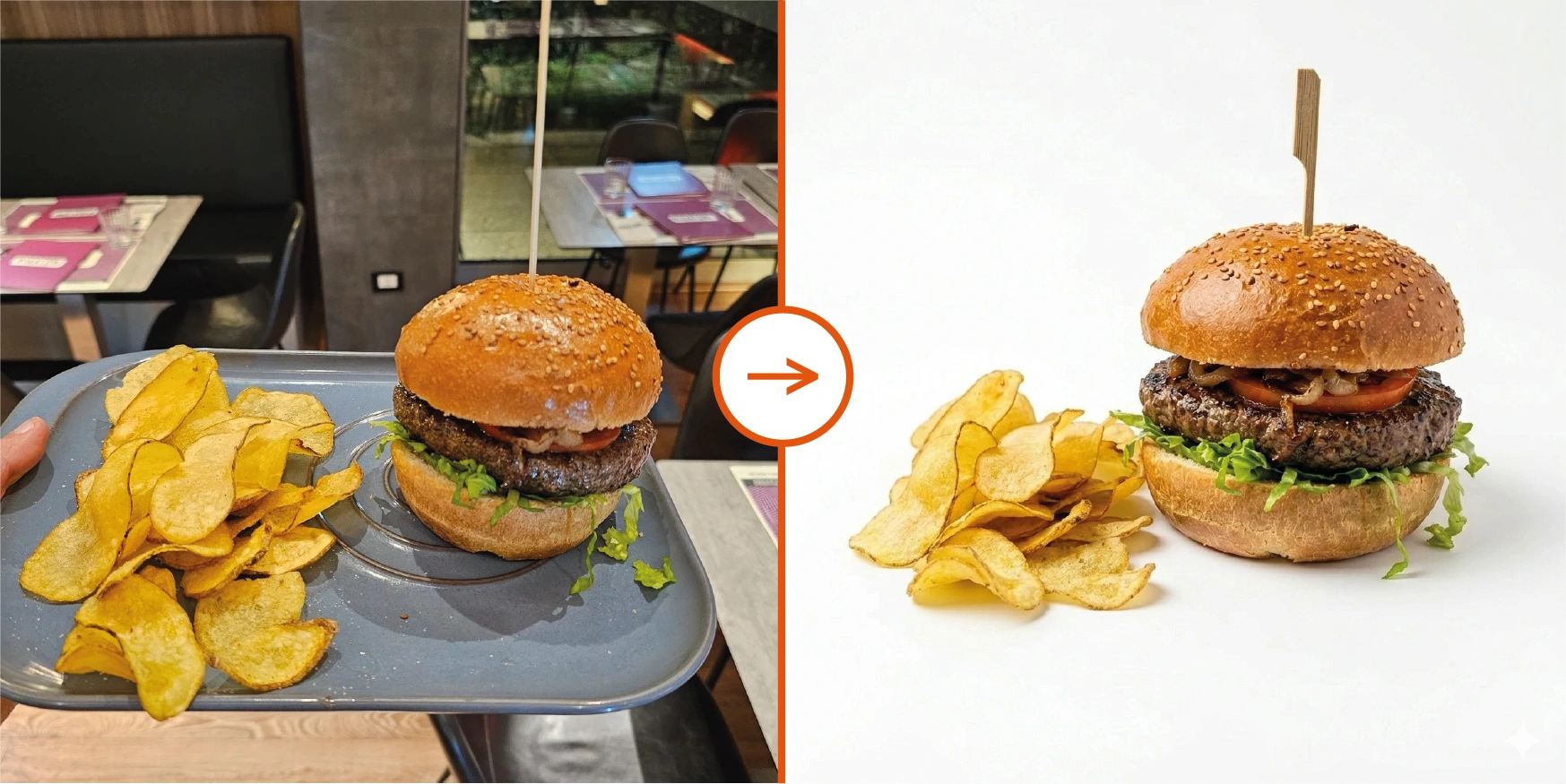
Optimize your digital menu on Glovo by harnessing the power of artificial intelligence with AI Food Photo. This tool transforms basic phone photos into studio-quality images in seconds: it enhances colors, cleans up backgrounds, and adjusts sizing to platform requirements — always preserving the authenticity of your dishes.
In this guide you will find the key steps to optimize your menu, improve your restaurant's presentation, and increase your orders on Glovo.
1. Optimize your Glovo menu photos first
Glovo is a highly competitive platform with thousands of partner restaurants competing for customer attention. One of the factors with the greatest impact on menu performance on Glovo is the visual quality of the dishes.
Why do Glovo online menu photos matter so much?
Restaurants on Glovo that add high-quality photos to their listings consistently see higher click-through and order rates compared to those without images.
Platform users compare many options in very little time, and a dark, cluttered, or unappetizing photo immediately lowers perceived value. Instead, an optimized photo makes your restaurant feel more trustworthy, the dish more desirable, and the menu more professional — increasing the likelihood the user chooses exactly that product.
That is why optimizing your Glovo menu photos is not just an aesthetic detail. It is a real lever for visibility and sales conversion.
Professional photos or phone photos?
Historically, restaurants have had two extreme options:
- Hire a professional photographer, studio, and food stylist
- Take quick photos in a busy kitchen
The first is not sustainable for restaurants that need to constantly update menus or pay for just one or two photos for seasonal specials or promotions. The second usually results in dark and unappealing images. Without proper lighting, professional equipment, knowledge of food photography, time for editing, and so on, these photos can make your food look worse than it actually is — and that costs you money.
The good news is that today you no longer need to organize a full photoshoot every time. With a starting photo taken by yourself and a specialized AI photography tool for restaurants, you can achieve the same results as a food photography agency but without the costs or time of a traditional production.
How to use AI to improve food photos quickly
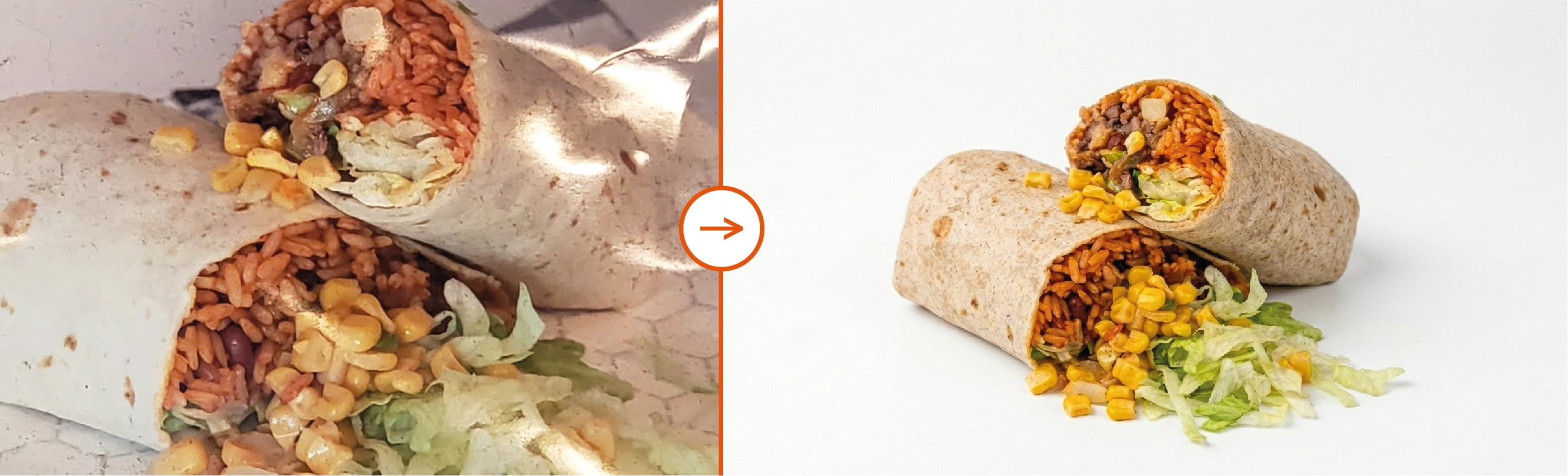
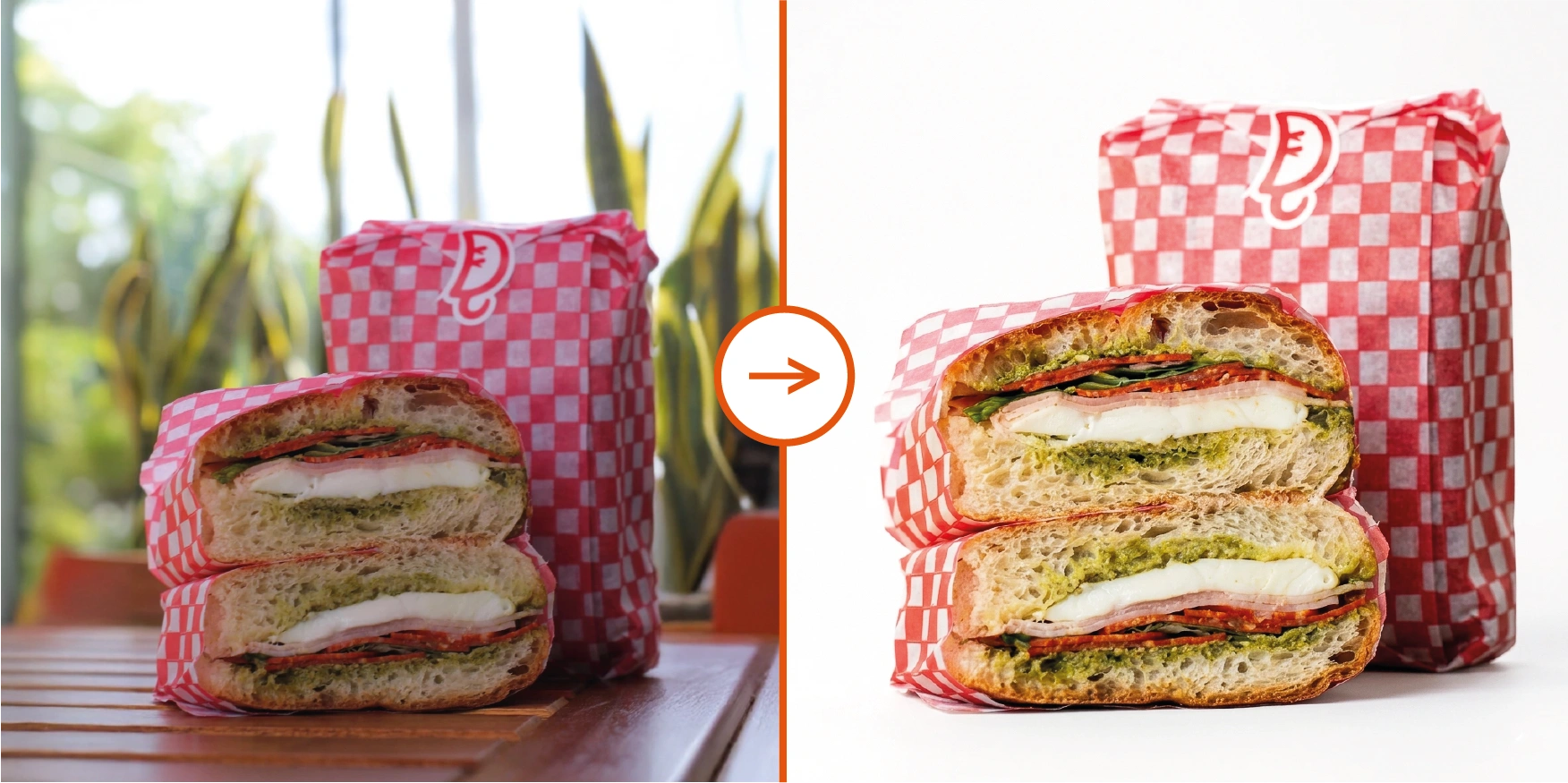
The most practical and simple workflow: you just need to take a photo of the dish with your phone (even before it leaves the kitchen), upload it to AI Food Photo, select the "Delivery" option and click "Transform with AI". In 20 seconds, you will have a professional-quality photo ready to stand out on your Glovo menu and drive sales.
This is what the AI does:
- Improves lighting and colors
- Adjusts framing and perspective
- Increases resolution
- Removes cluttered backgrounds and unnecessary elements
- Resizes following Glovo rules
If you want to dive deeper into how artificial intelligence can transform your food photos beyond a single platform, check out our complete guide: How to improve food photos online with AI for menus and delivery.
Glovo photo requirements
Optimizing Glovo menu photos is not only about making them look better. It also means following the platform's technical requirements so your menu stays publishable and images are approved without friction.
Restaurant logo
- Resolution: 1000 × 1000px minimum
- Aspect ratio: 1:1 square (restaurant logo)
- File type: JPG or PNG
- File size: under 10 MB
Header / cover photo
- Resolution: 1080 × 540px recommended
- Aspect ratio: 2:1 landscape
- File type: JPG or PNG
Menu item photos
- Resolution: 1200 × 800px minimum
- Aspect ratio: 3:2 landscape
- File size: under 10 MB
- File type: JPG or PNG
Glovo reviews submitted photos before they go live. Checking format, dimensions, and file size before uploading helps you avoid rejections and unnecessary delays.
2. Pair better photos with descriptions that make people want to order
The photo gets people to stop. The description helps confirm the choice. When images and copy work together, the menu becomes much stronger.
The winning formula is: Cooking method + Key ingredients + Distinctive detail.
Instead of writing
"Cheeseburger."
Write
"Hand-smashed double beef patty topped with melted aged cheddar, crisp house-pickled onions, and our secret sauce on a toasted brioche bun."
Using AI with models like Gemini or ChatGPT can also help you write more appetizing and detailed descriptions, ensuring a consistent tone and style across your entire menu.
This way you make sure to create a description easy enough to imagine and savor, to trigger cravings and drive the purchase.
Update the menu when dishes, seasons, or promos change
When you add a new dish, a seasonal item, or a promotion, having a suitable photo right away helps you present it better and avoids leaving the menu with old or missing imagery, keeping a more consistent experience for the user on Glovo.
3. Give your best photos more visibility with Glovo Prime & promotions
Why Glovo Prime can amplify a menu that already looks strong
Being visible where Glovo's most active customers browse and order most often increases the chances that your photos are actually seen. Glovo Prime subscribers order more frequently — if your menu is already strong visually, being featured in Glovo Prime-eligible listings and promotional placements can significantly amplify that advantage.
Promotions work better with high-quality photos
If the visual appearance of the food in your photo is weak, the offer loses impact. If on the contrary it is strong and appetizing, the promotion becomes much more effective.
Glovo platform promotions
- Glovo Prime: Glovo's subscription plan offering unlimited free delivery for members. Restaurants opted in get extra visibility and more frequent orders from high-value subscribers.
- Percentage or Fixed Discounts: e.g., '20% off' or £5 / $5 off orders from select restaurants, visible in the Offers section of the app.
- Free Item Offers: Promote a free side or drink with orders above a minimum spend to increase basket size and attract new customers.
- Sponsored Placements: Pay to have your restaurant or specific dishes appear prominently at the top of category and search results.
- Seasonal & Event Promotions: Special deals tied to holidays, sporting events, or local occasions featured prominently in the app.
Restaurant-managed promotions
- Restaurant Discounts: Set your own percentage or fixed-amount discounts (£ / $) visible directly on your Glovo menu listing.
- New Customer Offers: Targeted discounts to attract first-time buyers from your delivery radius.
- Happy Hour / Time-Limited Deals: Schedule discounts during off-peak hours to maximize orders throughout the day.
- Spend & Save: Incentivize higher basket sizes with threshold-based discounts (e.g., £5 / $5 off orders over £25 / $30).
In practice, prepare strong images first for your main dishes and hero items. Then use promos and banners to push the products you most want to grow.
4. Keep consistency between menu photos and the dish your customer receives
The menu photo is an expectation that the packaging must validate. Avoid customer frustration by ensuring the product arrives as promoted; the consistency between the image and reality is the key factor for generating repeat orders and improving your reputation on the app.
Delivery tips:
- Containers that prevent leaks for sauces, soups, and dressings
- Vented packaging for fried items to maintain crispiness during delivery
- Separate compartments for hot and cold foods to preserve proper temperature
- Branded touches like custom stickers or stamps to reinforce your restaurant's identity
- Practical details such as napkins, utensils, condiments, or wet wipes to improve comfort
The goal is simple: make sure the dish arrives in a condition that does not betray what the customer saw in the menu. That consistency protects reviews, trust, and the chance of reordering.
5. Use reviews and operational quality to reinforce the menu
On Glovo, trust matters almost as much as the image itself. If menu photos are strong but ratings, comments, or the final experience disappoint, the customer will not walk away with a good impression of your restaurant. That is why it helps to treat photos, delivery quality, and review management as one system.
To support conversion over time, focus on simple details that improve the overall experience:
- Include a handwritten thank-you note or printed message inside the bag
- Add a branded mint, sticker, or insert to create a memorable finishing touch
- Respond to all reviews within 48 hours, even negative ones
When imagery, perceived quality, and the real experience stay aligned, reviews usually improve and the menu becomes more credible. That helps not only one order, but your long-term performance and repeat order rate too.
Quick checklist to optimize your Glovo menu photos today
- 1
Review the photos you already have
Identify dishes with no image or with weak, old, or inconsistent photos compared to the rest of the menu.
- 2
Take simple base photos
A visible photo of the dish or drink is enough.
- 3
Enhance via AI
Open AI Food Photo, upload your photo, and select the "Delivery" option to make dishes look more appetizing, brighter, and more professional.
- 4
Update descriptions and key items
Strengthen your copy by making it more descriptive and more appetizing.
- 5
Push your best dishes with promos
Use discounts, offers, and promotions to increase your restaurant's visibility.
- 6
Check that the real experience is consistent
Packaging, delivery, and reviews should confirm what the customer saw in the photo.
Need to optimize your Glovo menu photos?
Stop losing sales to dark, blurry photos. Upload your first photo and see the transformation in 20 seconds.
Optimization guides for other delivery platforms
Do you also sell on other platforms? Check out our specific guides to optimize your menu on each one: